


RoadReady Ohio
4.272.00 Reviews
App Specs
- Version
- 0.0.11
- Updated On
- License
- Free
- Downloads
- 10,000+
- Developer
- Safe Roads Alliance, Inc.
- Categories
- Auto & Vehicles
- Platform
- Android
Screenshots
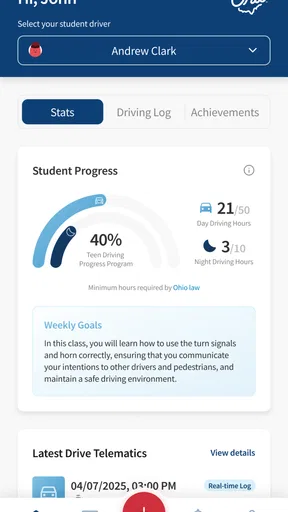
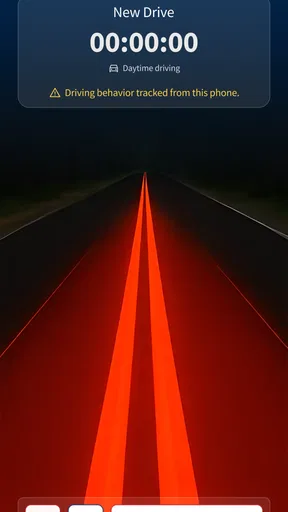
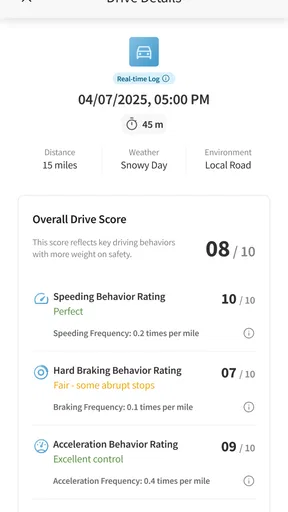
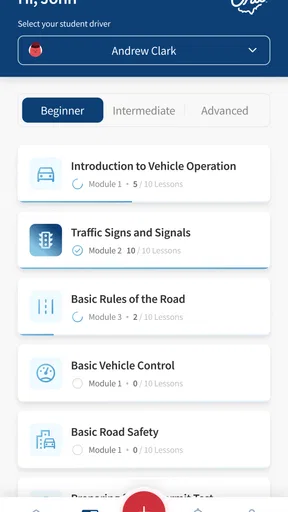
 Analysis by AppCompare
When I first looked at RoadReady Ohio, I wanted to know whether it could make learner-permit practice easier to organize, not whether an app could replace time behind the wheel. Its purpose is to help teens keep track of practice during the learner’s-permit phase, and that narrow focus is useful: the learner and supervising adult can pay attention to the drives themselves instead of relying on memory to reconstruct them later.
What to expect from a permit-practice log
This is an Auto & Vehicles app from Safe Roads Alliance, Inc., offered free and rated for Everyone. It is specifically called RoadReady Ohio, so its appeal is strongest for Ohio families looking for a tool centered on teen practice during the permit stage. I would not treat it as a general navigation app, a driving-school course, or a substitute for checking the current requirements that apply to your learner.
The key distinction is that a practice log helps make experience visible; it does not make a drive educational on its own. A teen can accumulate drives without noticing what remains unfamiliar, while a parent can assume a skill has been practiced simply because the car has been out. The log is most valuable when both people use it as a prompt to talk about the session and choose a sensible focus for the next one.
That makes it a better fit for families who want a shared routine than for learners who only want test questions or turn-by-turn directions. If you already keep a reliable written record and both teen and adult remember to update it, switching may not add much. If notes are scattered across texts, calendars, and paper, a dedicated place to record practice can reduce the end-of-week guesswork.
Getting started without overcomplicating the routine
For a first-time user, I would begin by setting up the learner’s profile with the adult who will usually supervise. Take a moment to make sure you understand how the app expects a session to be entered before the first drive, rather than trying to remember details while rushing out the door. The aim is a repeatable habit, not a perfect administrative system.
Agree on a simple division of responsibility: the supervising adult can remind the learner to log the drive, while the teen can add the details and a short reflection. That small agreement avoids a common friction point with shared records—each person assuming the other will take care of it. If one of you is busy after a drive, settle on a consistent time later that day to complete the entry while the route and conditions are still fresh.
A useful first session does not need to be long or ambitious. After a familiar, low-pressure trip, record what you practiced and note one thing that felt comfortable and one thing to work on. That gives the app a meaningful starting point and gives the next conversation a concrete subject, without turning every ordinary errand into a formal lesson.
Worth Reading Before You Choose

EA SPORTS FC Mobile 26 Is a Bigger Football Game, but It Takes Time

Flipboard Shows What News Apps Must Do Beyond the Feed

Switching to Android Auto Means Rethinking Your Driving Routine

Google Calendar Makes a Crowded Week Easier to Manage

Ludo King Makes the Most of the Minutes Between Plans

Baby Panda World Brings Quick Play to Modern Phones, but Its Game Library Feels Busy
Turning one ordinary drive into useful practice
Picture a parent and teen driving to a grocery store on a familiar local route. The teen handles the usual turns, then the pair briefly discusses lane position, scanning at intersections, or keeping a steady speed. Once parked, they record the session and note which part deserves attention next time. The drive may have been routine, but the record helps turn it into a deliberate step rather than an hour that disappears from memory.
For a stronger learning routine, choose one main goal before setting off and keep the post-drive note focused. Trying to judge every maneuver at once can overwhelm a new driver and make feedback feel like a list of faults. A single observation—such as remembering to check mirrors before changing lanes—gives the learner something specific to practice on the next suitable route.
Families can also use the log to spot gaps in the kinds of experience they are offering. A run of short daytime trips may build comfort with local streets but leave the teen less familiar with other conditions. Rather than chasing a checklist for its own sake, use the record to ask what the learner has actually encountered, what felt difficult, and what can be practiced safely with a qualified supervising adult.
How it compares with paper notes and general driving apps
Compared with a notebook, a dedicated app can make it easier to keep entries together and revisit the learner’s practice history. Paper still has advantages: it works without opening a phone, can be shared at a glance, and may suit families who already maintain a consistent log. The better option is the one the teen and adult will actually update after each drive; a polished digital record is not helpful if it is routinely left incomplete.
General driving or navigation apps solve different problems. They can help with directions or route planning, but they are not automatically designed around a teen’s permit-practice routine. Conversely, a practice log should not be expected to provide the live guidance or formal instruction that another tool or a driving instructor may offer. I would use each for its proper job rather than asking one app to cover the entire learning process.
The practical trade-off is attention. Logging on a phone is convenient after the car is parked, but it can become another distraction if someone tries to enter details while the vehicle is moving. Make the entry a parked-car task, and keep the actual drive focused on the road and the supervising adult’s instructions.
Keeping records useful, not merely complete
One of the most useful habits is to write notes that will still make sense a week later. “Good drive” is pleasant but gives little direction; “needed reminders to slow before the turn” is more actionable. Keep the wording fair and specific, especially if a parent and teen both look back at the record. The goal is to support learning, not to make the log feel like a scorecard.
It also helps to compare entries over time rather than judging progress from one difficult trip. A learner may be confident on a familiar route and uncertain when traffic or road layout changes. That does not necessarily mean practice has gone backward; it can show where experience is still narrow. Use patterns in the notes to choose manageable next steps, and leave challenging conditions for moments when the supervisor believes they are appropriate.
If the household has more than one adult supervising, agree on a shared approach to feedback. Different adults may notice different things, which can be useful, but conflicting instructions can confuse a beginner. A quick conversation about the next practice goal helps keep the record connected to a consistent plan rather than becoming a collection of unrelated comments.
Where expectations need to stay realistic
A log can organize practice, but it cannot verify that a teen has mastered a skill or that a particular drive meets every applicable requirement. I would use it alongside the family’s understanding of Ohio’s current learner rules and any guidance from an instructor or licensing authority. Before relying on an entry for an administrative purpose, check that the record and the official requirements match.
It is also not the right choice for someone who wants a complete driver-education curriculum, live coaching, or a replacement for a supervising adult. A teen who needs structured instruction may benefit more from an instructor-led lesson, while a family that only wants directions should choose a navigation tool. The app’s focused role is record-keeping around practice, and it works best when that is what you need.
RoadReady Ohio has an average rating of 4.3 from around 170 ratings, with 10K+ installs. Those figures suggest that other users have found a reason to try it, but they do not tell me whether its routine will suit a particular family. I would judge it by a practical test: can the teen and adult enter a drive easily, use the record to agree on what comes next, and keep doing that consistently?
Making the next drive more purposeful
After a few entries, look for one area that has received little attention and plan a suitable opportunity to practice it. Avoid turning that observation into pressure to cover everything immediately. A calm, familiar route may be the right place to reinforce basics, while a more demanding setting should wait until the learner and supervisor are ready. That gradual approach makes the record useful without letting it dictate unsafe choices.
New users may also wonder whether they should log every trip. I would prioritize supervised practice that is part of the learner’s preparation and follow the applicable Ohio guidance for what must be recorded. A consistent, accurate habit is more valuable than hurriedly entering a large backlog from memory. If you forget a detail, do not guess just to make the entry look complete.
The app is free, which makes it easy for a family to try the routine without committing to a purchase. It was released on Aug 7, 2025, and its current version is 0.0.11; I would still check that it runs properly on the device you plan to use before building a long-term process around it. Its listed minimum OS is 7.1, so compatibility is worth checking if the teen or supervising adult uses an older device.
For a first successful use, keep the goal modest: complete one supervised drive, record it while the details are fresh, and agree on one useful focus for the next session. If that makes practice easier to discuss and remember, the app is doing its job. If the family finds that the extra step goes unused, a simple paper routine or another established method may be more realistic.
First Impressions
Upon opening RoadReady Ohio, the interface immediately caught my eye. It's clean, user-friendly, and doesn't bombard you with unnecessary information. Instead, it focuses on what you need to know. The app is designed with simplicity and efficiency in mind, which is fantastic for tech novices and young drivers alike.
The setup process is straightforward. You start by creating a profile, entering your driving goals, and the app customizes your experience accordingly. It's like having a personal driving coach right in your pocket.
Features That Stand Out
One of the first things I noticed was the comprehensive driving log. It allows you to track your driving hours, which is crucial for learners needing to meet state requirements. The log is intuitive and provides a detailed breakdown of your sessions, including time, weather conditions, and road types. This feature is a game-changer for keeping a structured record without the hassle of manual logging.
Another nifty feature is the parental access. Parents can monitor progress, ensuring that the learning driver is getting the diverse experience required. It promotes a collaborative learning environment where parents can give feedback and tips based on the logged sessions.
The app also includes a practice test section, which is a lifesaver. It offers sample questions that mimic the real driving test, allowing you to practice until you're confident. The questions are up-to-date and cover a wide range of topics, ensuring you're well-prepared for the big day.
Real-World Application
What sets RoadReady Ohio apart is its focus on real-world driving scenarios. The app doesn't just prepare you for a test; it prepares you for actual driving. It encourages you to drive in different conditions and times of day, which is essential for becoming a well-rounded driver.
- Night driving
- Highway driving
- Adverse weather conditions
These elements are crucial, and the app ensures you experience them before taking the wheel solo.
Feedback and Improvement
Every session ends with a feedback section where you can add notes about what went well and what didn’t. This feature encourages reflective learning, which is incredibly important for skill development. Plus, you can set goals for your next drive, making each session purposeful.
It's also worth mentioning the app's updates. The developers are active and receptive to user feedback, ensuring the app evolves with user needs. Regular updates bring new features and improve existing ones, which is always a plus in my book.
Final Thoughts
All in all, RoadReady Ohio is a solid choice for anyone embarking on their driving journey. It combines practical features with a user-friendly interface, making the learning process less daunting and more structured. The app covers all bases, from tracking driving hours to preparing for the test, ensuring you're ready for the road.
Whether you're a new driver or a parent helping your teen learn to drive, RoadReady Ohio offers invaluable support. It's like having a co-pilot who’s focused on your learning journey, ensuring you become a confident and safe driver.
Pros
- User-friendly interface for easy navigation.
- Comprehensive practice tests available.
- Tracks your progress effectively.
- Includes up-to-date Ohio traffic laws.
- Accessible offline for convenience.
Cons
- Limited customization of practice tests.
- Ads can be somewhat intrusive.
- Requires regular updates for accuracy.
- No dark mode option available.
- Lacks interactive learning features.
FAQs for RoadReady Ohio
What is RoadReady Ohio and how does it benefit new drivers?
RoadReady Ohio is a comprehensive app designed to assist new drivers in logging and tracking their driving hours as required by Ohio's licensing regulations. It offers tools to monitor progress, set driving goals, and ensure compliance with state requirements. This app is particularly beneficial for teens and their parents, providing peace of mind and a structured approach to gaining driving experience.
Is RoadReady Ohio compatible with both Android and iOS devices?
Yes, RoadReady Ohio is available for download on both Android and iOS platforms. The app is designed to provide a seamless experience across different devices, allowing users to log their driving hours and track progress regardless of the operating system they use. Be sure to check the app store for compatibility with your specific device version.
Does RoadReady Ohio require an internet connection to function?
RoadReady Ohio does not require a constant internet connection to log driving hours, making it convenient for use in areas with limited connectivity. However, an internet connection is necessary for certain features, such as syncing data across devices and accessing updates. It is recommended to periodically connect to the internet to ensure all data is backed up and current.
How does RoadReady Ohio ensure the privacy and security of user data?
User privacy and security are top priorities for RoadReady Ohio. The app uses encryption to protect personal information and driving logs. Additionally, data is stored securely and only accessible by the user. RoadReady Ohio adheres to strict privacy policies and does not share user data with third parties without explicit consent.
Are there any in-app purchases or subscriptions in RoadReady Ohio?
RoadReady Ohio is free to download and use for basic features, which include logging driving hours and tracking progress. However, there may be optional in-app purchases or subscriptions available for advanced features and additional resources. Users can choose to enhance their experience with these options, but they are not required for the app's primary functionality.


